[ fcp://@fc.onlinehelp.com,%237600229/En/OnlineHelp/Web%20Help/LW2 ]Contents [ fcp://@fc.onlinehelp.com,%237600229/En/OnlineHelp/Web%20Help/LW31 ][Image:81203_43854_21.png][ fcp://@fc.onlinehelp.com,%237600229/En/OnlineHelp/Web%20Help/LW42 ][Image:81203_43840_19.png] [Marker][ fcp://@fc.onlinehelp.com,%237600229/En/OnlineHelp/Web%20Help/LW32#The reading pane ]The reading pane [ fcp://@fc.onlinehelp.com,%237600229/En/OnlineHelp/Web%20Help/LW32#Opening the reading pane ]Opening the reading pane --------------- [Marker]The reading pane When the reading [ fcp://@fc.onlinehelp.com,%237600229/En/OnlineHelp/Definitions/L2018 ]pane is open, it is displayed under or to the right of the main pane. The reading pane displays the contents of any object selected in the main pane. For example, a selected message or document opens in this pane. You can work with objects in the reading pane just as you do when they are opened in the main pane. [ fcp://@fc.onlinehelp.com,%237600229/En/OnlineHelp/Web%20Help/LW32#Top ]Top --------------- [Marker]Opening the reading pane To open the reading pane, click this button: [Image:892006_13851_0.png] This button is only visible if you have the navigation pane open. It [ fcp://@fc.onlinehelp.com,%237600229/En/OnlineHelp/Definitions/L2035 ]toggles through three states. To move the reading pane to the right of the main pane, click this button again. To close the reading pane, click this button a third time. [ fcp://@fc.onlinehelp.com,%237600229/En/OnlineHelp/Web%20Help/LW32#Top ]Top
   
F2024
 
 
Home  •  Help  •  Practical Uses for FirstClass  •  101 Uses for FirstClass  •  F2024
81903_22607_2.pngTrack customer interest

Minimum version:
FirstClass 8.3

Audience:
Business professionals

Experience
:  9203_22631_1.png
FirstClass applications used:
            8102006_40754_0.pngConferencing
9203_31709_1.png Summary
Want to find out how much interest your customers have in a new product or sale? Post the information in a customer conference, and then check the history of the message to determine how many people have viewed it, and exactly who has shown interest.
9203_31709_1.png Example
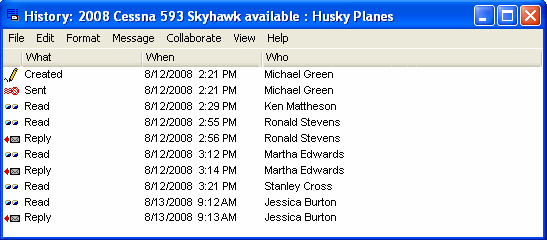
Michael Green is the VP of Sales and Marketing at Husky Planes. He wants to know what kind of interest there is in his new product so he has some idea about how to price it. He posts the message in a conference that his customers have access to, and then waits.
A week later he checks the history of the message to see how many people have read it, and exactly who has shown interest in it.
8102006_30622_0.png